
⚡ Quick Answer
A good AI story video generator turns a script and a scene plan into clips you can assemble into a story. Of the three we compare, Runway is built for creators who want a full toolkit (from $15 a month, free plan available), Luma gives you several top video models under one plan (from $30 a month), and invideo AI pairs a generator with a timeline editor (from $9 per seat a month). Whichever you pick, the story matters more than the tool, so plan it first. Prices checked 20 October 2026.
You have a story in your head: a hook, a twist, a product that saves the day. Then you open an AI video tool and face a blinking cursor and a credits counter. Most people burn their first credits on scenes that do not connect.
The fix is to separate the two jobs. First you plan the story. Then you let a video generator render it. This guide compares three AI story video generators on what they offer and what they cost, and shows where the story-planning step fits.
Start With the Story, Not the Tool
A generator makes clips. It does not know your hook, your reveal or what each scene should leave the viewer wondering. That part is the story, and it is the difference between a stack of pretty clips and a video people finish.
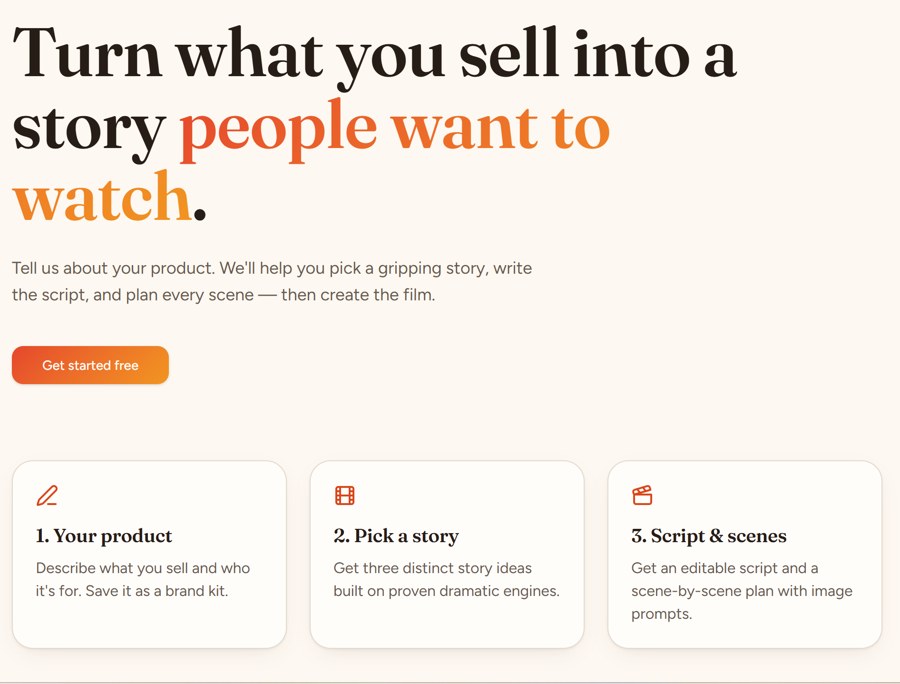
If you make story-led ads, the Academy’s Story Spark app covers that first step. You describe your product and who it is for, get three story ideas built on proven dramatic engines, and receive an editable script plus a scene-by-scene plan with image prompts. Those prompts are what you paste into the generator. Our AI Micro Drama Ads Academy review covers what else is included.
$97/month · Cancel anytime · Or $970/year (2 months free)
The Three Tools at a Glance
| Tool | Free plan | Entry paid plan | Best for |
|---|---|---|---|
| Runway | Yes, 125 one-time credits | $15 a month ($12 billed yearly), 625 credits | Creators who want a full toolkit |
| Luma | See the pricing page | $30 a month, 10,000 credits | Using several top models under one plan |
| invideo AI | See the pricing page | $9 per seat a month (monthly billing), 190 credits | A generator and a timeline editor in one place |
Prices are from each tool’s official pricing page, checked 20 October 2026. Annual billing is cheaper on all three, and promotions change often.
Runway: A Full Toolkit for Creators
Runway is a creative suite for AI video, images and audio. Its paid plans give you access to all of its video and image models, including Gen-4.5 and Kling 3.0, plus music, voice and sound-effect generation and no watermarks.
- Free: $0 with 125 one-time credits to try the tools
- Standard: $15 a month ($12 billed yearly), 625 credits a month, which the page says equals 52 seconds of Gen-4.5. Includes 4K upscaling and 3 projects
- Pro: $35 a month ($28 yearly), 2,250 credits, 1 brand kit and 1 custom voice clone
- Max: $95 a month ($76 yearly), 9,500 credits, with unused credits rolling over for one month
Why it fits story work: you can generate, upscale and add voice and music in one place. Plan for: credits go quickly on longer clips, so write the scene plan first and generate only the shots you need.
Luma: Several Top Models Under One Plan
Luma offers its own video models and third-party ones, and lists Kling 3.0 and Veo 3.1 among the options on its credit table. Plans include commercial use.
- Plus: $30 a month, 10,000 credits, Luma and third-party image and video models, commercial use
- Pro: $90 a month, 40,000 credits and 4x usage with the Luma Agents
- Ultra: $300 a month, 150,000 credits
Cost depends on the model and resolution. For example, the page lists Ray3.2 text-to-video at 720p for 100 credits per 5 seconds, so 10,000 credits cover about 100 five-second clips at that setting.
Why it fits story work: you can try different models on the same scene and keep the one that looks best. Plan for: credit costs vary a lot by model, so test one shot before you batch.
invideo AI: A Generator With a Timeline Editor
invideo AI combines AI generation with a full timeline editor, which helps when you want to cut, caption and mix your scenes in the same place. Prices are per seat and credits are shared by plan.
- Basic: $9 per seat a month on monthly billing, 190 credits, with access to selected models and Seedance 2.0 Fast and Mini
- Pro: $30 per seat a month, 1,000 credits, access to all models and features and to Seedance 2.5
- Ultra: $80 per seat a month, 3,000 credits, with the lowest cost per credit
The page currently shows a 50% discount on annual plans, which brings Basic to $4, Pro to $15 and Ultra to $40 per seat a month, billed annually.
Why it fits story work: editing, color and audio sit next to the generator, so a micro drama can go from clips to a finished cut in one tab. Plan for: Basic does not include the top models, so a story project often fits Pro better.
How to Choose
- Want the most complete creative toolkit, with a free plan to start? Runway
- Want to compare several top models, with commercial use included, from $30 a month? Luma
- Want to edit the story in the same place you generate it? invideo AI
Tips for Getting Better Story Videos
- Plan the scenes first. One line per scene, with the image prompt ready
- Start from a reference image. Image-to-video keeps characters consistent
- Test one shot, then batch. You will waste fewer credits
- Keep scenes short. Short clips cost fewer credits and keep the pace quick
- Label AI-made videos and follow each platform’s ad rules
If you want the full process, from story to published ad, read our guide to making an AI micro drama. If you would rather use many models from one account, see our Pollo AI review.
$97/month · Cancel anytime · Or $970/year (2 months free)
Frequently Asked Questions
What is an AI story video generator?
An AI story video generator turns a script, a scene plan or a prompt into video clips, often with voice and music. Some tools generate single clips from text or images, and others pair the generator with an editor so you can assemble a full story.
What is the best AI story video generator?
It depends on how much control you want. Runway suits creators who want a full toolkit, Luma suits people who want several top video models under one plan, and invideo AI suits people who want a generator and a timeline editor in one place. All three have plans you can test.
Are there free AI story video generators?
Runway has a free plan with 125 one-time credits to explore its tools. Luma and invideo AI list paid plans on their pricing pages, so check each page for any free trial before you buy. Prices are from the official pages, checked 20 October 2026.
How much does an AI story video generator cost?
Entry plans are $15 a month on Runway ($12 billed yearly), $30 a month on Luma and $9 per seat a month on invideo AI (monthly billing). Credits run out faster on higher resolutions, so the real cost depends on how many clips you make.
Can I use AI videos commercially?
Luma lists commercial use on its Plus plan, and Runway lists no watermarks on paid plans. Terms differ by tool and plan, so read the terms before you use a video in an ad.
How do I keep a character consistent across scenes?
Start from a reference image of the character and use image-to-video, then reuse the same description and style in every prompt. Planning every scene in advance, as the Story Spark app does for Academy members, makes this much easier.
Do I need a story before I choose a tool?
Yes. A clear hook, a rising problem and a reveal matter more than the model you pick. Write the arc and the scene plan first, then use the video tool to render it.
Sources & References
- Runway pricing page: plans, credits and models, checked 20 October 2026
- Luma pricing page: plans, credits and cost per generation, checked 20 October 2026
- invideo AI pricing page: plans, credits and annual discount, checked 20 October 2026
- Official AI Micro Drama Ads Academy page: Story Spark app, checked 20 October 2026
Related reviews
How we checked this: every figure here is read at the primary source and linked, never taken from another article. Where a number is someone’s own claim about their product, we say so in the text. Read our full review methodology and affiliate disclosure.