
⚡ Quick Answer
To host an HTML file for free, upload it to a static host. The fastest way is Tiiny.host: drag in your HTML file or a ZIP, name the link and publish, no Git or server needed. Three other free options are Netlify Drop (drop a project folder), Cloudflare Pages Direct Upload (ZIP or folder) and GitHub Pages (public repository). All four work for static files: HTML, CSS, JavaScript and images.
You have an HTML file that works on your computer. Double-clicking it opens it in your browser, and that is where it stops: nobody else can see it. To share it, the file has to live on a server connected to the internet.
The good news is that hosting a single page no longer needs a hosting plan, a domain or any technical setup. This guide compares four free ways to do it, step by step, so you can pick the one that fits and have your page online today.
Free plan available · No Git or server needed · 7-day money-back guarantee on paid plans
Before You Start: Get Your File Ready
- Name the main file index.html. Most hosts look for that name as the front page of your site
- Keep everything together. If your page uses images, CSS or JavaScript files, put them in the same folder and link them with relative paths, then zip the folder if you have more than one file
- Test it locally first. If it opens correctly on your computer, it will open the same way online
- Remember it is static. These hosts serve files exactly as they are. Pages that need a server, a database or a CMS like WordPress are a different kind of hosting
Option 1: Tiiny.host (Our Pick for Most People)
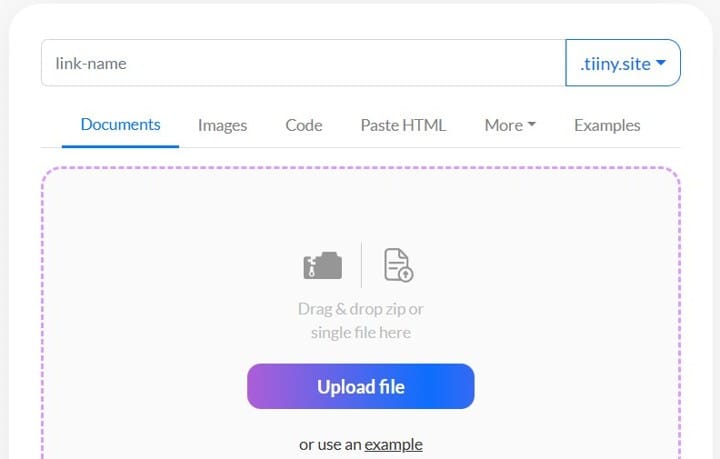
- Open Tiiny.host and sign up for the free plan
- Drag your HTML file or ZIP into the upload box, or use the Paste HTML tab
- Choose a link name on the .tiiny.site domain
- Click upload. Your page is live, with SSL and a CDN included
Free plan limits: 1 project, a 3 MB upload, 5,000 visits and 5 GB of bandwidth a month. The company says free links stay online indefinitely as long as you log in at least once every 3 months. Paid plans start at $5 a month billed yearly and add a custom domain, password protection, QR codes and analytics. Our Tiiny.host review covers every plan.
Why it is our pick: there is nothing to configure, it takes a single file as well as a ZIP, and it is the only one of the four built for sharing: password protection, QR codes and analytics sit on its paid plans. You can try it free and see your page live in minutes.
Best for: finished pages and files you want online in a minute, and for sharing PDFs and presentations too.
Option 2: Netlify Drop (Developer Platform, Drag and Drop)
- Put your files in a folder, with index.html at the top (unzip a ZIP first)
- Open Netlify Drop and drag the folder onto the page
- Netlify publishes it and gives you a link
Free plan: 300 credits a month. According to Netlify’s pricing page, each production deploy costs 15 credits, and bandwidth and requests also use credits. Netlify’s documentation says no account is required to drop a folder, and its free plan lists custom domains with SSL.
Best for: people who may keep building the site with code and want a path into a full platform. We compare it in detail in Tiiny.host vs Netlify Drop.
Option 3: Cloudflare Pages Direct Upload
- Create a Cloudflare account and open Workers and Pages in the dashboard
- Create an application and choose Direct Upload
- Name the project and drop in a ZIP or a single folder of files
- Deploy, and Cloudflare serves the site from its global network
Free plan limits: 20,000 files per site, a 25 MiB maximum per file, 100 custom domains per project and 100 projects per account. One thing to know before you start: Cloudflare states that if you choose Direct Upload, you cannot switch that project to Git integration later.
Best for: larger static sites and people who want to grow into the Cloudflare ecosystem.
Option 4: GitHub Pages
- Create a GitHub account and a new repository
- Name it your-username.github.io for a user site
- Upload your files, with index.html at the top level of the source folder
- Choose the publishing source in the repository settings and wait for it to publish, which can take up to 10 minutes
Free plan limits: on GitHub Free, the repository must be public. Published sites may be no larger than 1 GB, with a soft bandwidth limit of 100 GB a month. GitHub states that Pages is not intended for or allowed as a free hosting service to run your online business.
Best for: portfolios, documentation and personal projects, especially if you already use GitHub.
The Four Options Compared
| Tiiny.host | Netlify Drop | Cloudflare Pages | GitHub Pages | |
|---|---|---|---|---|
| What you upload | Single file, ZIP or pasted HTML | A project folder | A ZIP or a folder | Files in a repository |
| Technical steps | None | Low | Low to medium | Medium |
| Free plan limits | 1 project, 3 MB, 5,000 visits a month | 300 credits a month | 20,000 files, 25 MiB per file | 1 GB site, public repository |
| Custom domain on free | No, from $13 a month | Yes, per Netlify’s pricing page | Yes, up to 100 per project | Yes |
| Best for | Finished files and pages, fastest | Developers growing into Netlify | Bigger static sites | Portfolios and docs |
Limits and prices are from each provider’s official documentation, checked on 14 October 2026.
Which Should You Choose?
For most people, the answer is Tiiny.host: it is the quickest, needs no technical steps and has a free plan to try. The other three earn their place in specific situations:
- You want it online in the next five minutes: Tiiny.host
- You want your own domain without paying: Netlify Drop or Cloudflare Pages
- You already use GitHub and keep your work there: GitHub Pages
- You are sharing a PDF, a presentation or a client deliverable with a password: Tiiny.host
Hosting a Page Made With AI
If ChatGPT, Claude or an AI app builder generated your page, the last step is the same: save the code as index.html (or export the project as a ZIP) and upload it to one of the hosts above. Our guides on vibe coding for beginners, how to build an app with AI without coding and the best no-code AI app builders cover the building side. To compare hosts beyond these four, see our Netlify alternatives guide.
Tiiny.host · Free plan · Live link in about a minute
Frequently Asked Questions
How do I host an HTML file for free?
Upload it to a free static host. With Tiiny.host you drag in a single HTML file or a ZIP and get a live link. With Netlify Drop you drop a project folder, with Cloudflare Pages you use Direct Upload with a ZIP or folder, and with GitHub Pages you publish from a public repository.
Can I host a single HTML file?
Yes. Tiiny.host accepts a single HTML file, a ZIP or pasted HTML. Netlify Drop is built around a project folder, Cloudflare Pages Direct Upload accepts a ZIP or a folder, and GitHub Pages publishes the files in a repository, so a single file goes in as index.html.
Do I need to know how to code to host an HTML page?
No. If you already have the HTML file, hosting it is an upload, not coding. Tiiny.host and Netlify Drop need no Git or command line, and Cloudflare Pages Direct Upload works from the dashboard.
Is free HTML hosting good enough for a business?
It depends on the host. GitHub Pages states it is not intended for or allowed as a free hosting service to run your online business. Tiiny.host, Netlify and Cloudflare Pages have free plans with limits, and paid plans add custom domains, passwords and higher limits.
Can I use my own domain with a free HTML host?
On Netlify and Cloudflare Pages, custom domains are listed on the free plans. On Tiiny.host, custom domains start on the Solo plan, at $13 a month billed yearly. GitHub Pages supports custom domains as well.
What is the fastest way to host an HTML file?
Tiiny.host is the quickest for most people: drag in the file or a ZIP, choose a link name and publish. GitHub Pages is slower to set up, and the site can take up to 10 minutes to publish after you push changes.
Can I host a page made with ChatGPT or another AI tool?
Yes. Save the generated code as an HTML file named index.html, or download the project as a ZIP, and upload it to any of these static hosts. Pages that need a server or database are a different job.
How long will a free Tiiny.host link stay online?
The company says links stay online indefinitely on the free plan as long as you log in to your account once every 3 months.
Sources & References
- Tiiny.host official pricing page and FAQ, checked 14 October 2026
- Netlify official pricing page and documentation on deploys, checked 14 October 2026
- Cloudflare Pages documentation: limits and Direct Upload, checked 14 October 2026
- GitHub Docs: GitHub Pages limits and creating a GitHub Pages site, checked 14 October 2026
Related reviews
How we checked this: every figure here is read at the primary source and linked, never taken from another article. Where a number is someone’s own claim about their product, we say so in the text. Read our full review methodology and affiliate disclosure.